
This section describes the extended architecture of the Webitel production environment designed for ~1,000,000 calls and ~200,000 chats per day.
1. General Architecture Diagram
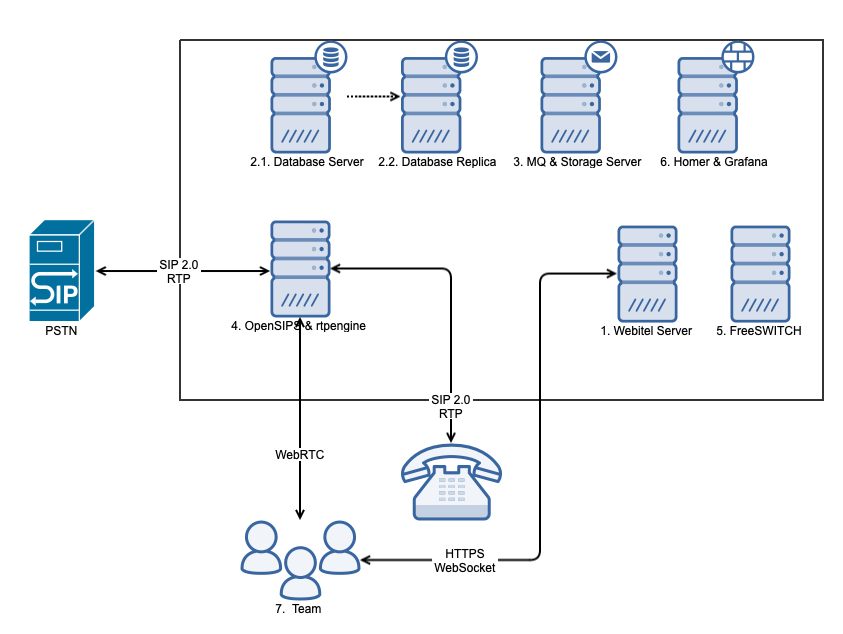
2. Deployment Environment Requirements
The Webitel architecture is designed to operate in environments with isolated and guaranteed resources. Using budget VPS/VDS (Virtual Private/Dedicated Server) instances with shared CPU time is not recommended due to the risks of “noisy neighbors” and high network latency, which is critical for the quality of VoIP components (FreeSWITCH, RTP, OpenSIPS).
Supported platforms include:
-
On-Premise (Local servers):
-
Physical servers (Bare Metal);
-
Enterprise hypervisors (VMware, KVM, Xen, Proxmox VE).
-
-
Cloud Providers:
-
AWS (Amazon EC2);
-
Google Cloud (Compute Engine);
-
Microsoft Azure (Virtual Machines);
-
DigitalOcean (Droplets);
-
Hetzner (Cloud / Dedicated).
-
IMPORTANT! When choosing cloud provider plans (especially DigitalOcean and Hetzner), it is strongly recommended to select virtual machines in the following categories:
-
Dedicated vCPU, or
-
Compute-Optimized,
for components responsible for media and voice processing.
3. Description of the General Infrastructure
For an industrial environment with a load of 400–500 simultaneous calls (~1 million calls per day) and 200,000+ chats per day, you need to prepare 7 virtual machines (items 1–6 in the table below).
Deployment requirements:
-
Install only the operating system and keep Internet access enabled to download and install additional software.
-
After installation is complete, Internet access may be disabled on all virtual machines.
-
Virtual machines 1–6 must operate within the same VLAN, with no port filtering (allow all traffic).
-
Developers must be provided with SSH access using root privileges for the duration of installation and testing.
-
The reservation should be provided by the capacity of virtual machines.
4. Server Specification
|
Object |
Software |
Resources (min) |
Connectivity |
Description |
|---|---|---|---|---|
|
Debian 12 Linux 64bit - basic server installation with SSH connection; Additionally, we will install: Nginx; SSL; Webitel Services |
|
in-out: 80/tcp, 443/tcp |
SSL certificates with a trusted CA are required to provide a secure connection via HTTPS protocol and telephony in a browser. Scaling is possible. |
|
Debian 12 Linux 64bit - basic server installation with SSH connection; Additionally, we will install: Linux; PostgreSQL 15; Grafana |
|
|
PostgreSQL database server with configured Streaming Replication.
|
|
Debian 12 Linux 64bit - basic server installation with SSH connection; Additionally, we will install: Linux; Redis Server; Consul; RabbitMQ; Webitel Storage |
|
|
Application registration server, messaging service, and call recording storage. The call records are stored in S3 storage. |
|
Debian 12 Linux 64bit - basic server installation with SSH connection; Additionally, we will install: OpenSIPS 3.4, Rtpengine; |
|
5060/tcp, 5060/udp, 5061/tcp in-out: 10000-50000/udp |
Telephony server. Scaling is possible. |
|
Debian 12 Linux 64bit - basic server installation with SSH connection; Additionally, we will install: FreeSWITCH; Webitel FlowManager; |
|
|
Server for building voice applications. When the load increases, it is necessary to duplicate the server. Scaling is possible. |
|
Debian 12 Linux 64bit - basic server installation with SSH connection; Additionally, we will install: Homer + PostgreSQL, Grafana; |
|
|
Grafana for analytics. Collection of logs and call logs. |
|
Microsoft Windows 11 / Linux 64bit Google Chrome / Microsoft Edge (the latest or previous version) |
|
Connection to the IS not less than 2 Mb/s per user, with delays of no more than 15-20 ms. |
Employees’ workplace |
|
|
|
Connection to the IS not less than 5 Mb/s per device, with delays of no more than 15-20 ms. in-out: 5060/udp, 10000-20000/udp |
Hardware phone with SIP 2.0 protocol support |
|
|
|
|
Integrations with external systems |
|
10. PSTN |
|
|
|
Public Switched Telephone Network is a general subscriber communication network, the access to which is provided by telephone sets, PBX, and data transmission equipment. |
5. Network Parameter Requirements
|
|
Connection speed |
Delay (Ping) |
Jitter |
Packet Loss |
|---|---|---|---|---|
|
WebRTC |
|
|
|
|