
1. Description
The Supervisor application is designed to monitor and configure Agents' work. Available to Supervisors.
Programmatically restricted access rights - display information about Agents (Queues and calls) of a particular Supervisor.
It consists of the following elements:
-
Side menu (Fig.1.(1));
-
Design theme switch (Fig.1(2));
-
Applications menu (Fig.1.(3));
-
User menu (Fig.1.(4));
-
Main menu (Fig.1.(5)).
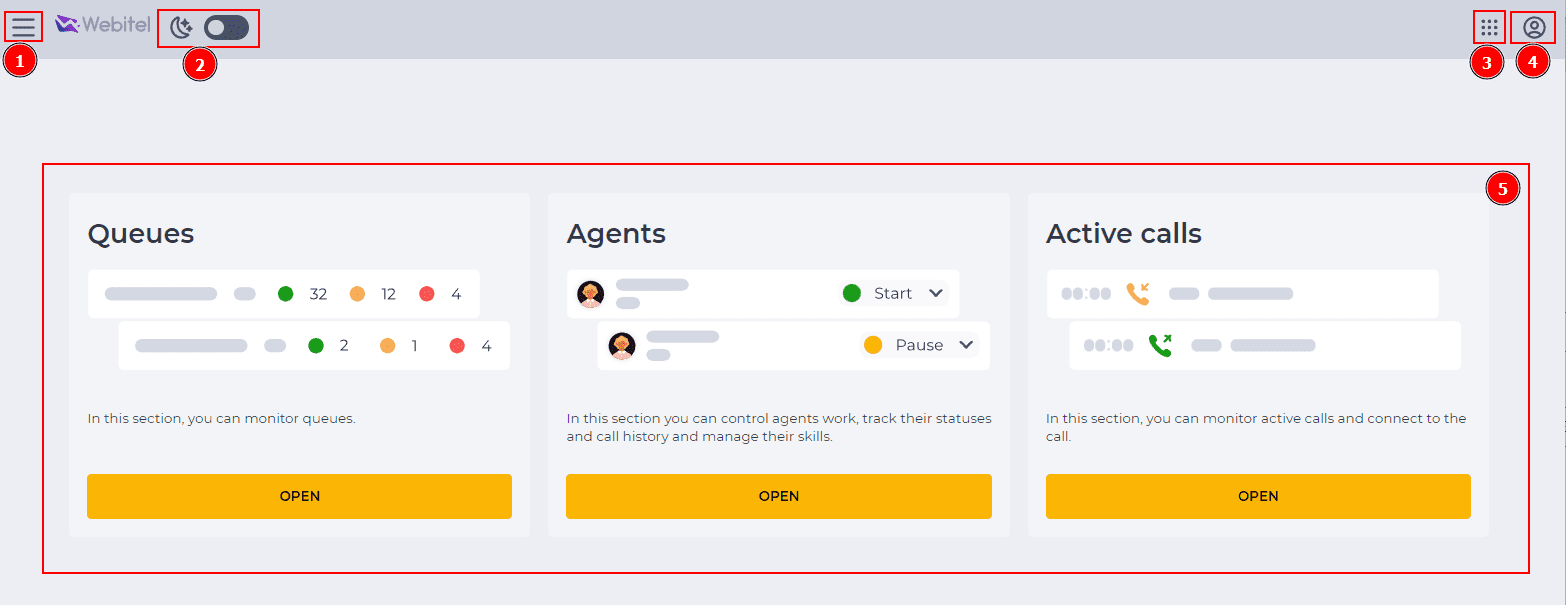
Fig. 1. Main page
The Side menu, Application menu, and User menu are on all pages of the Supervisor application.
1.1. Side menu
It is opened by clicking the menu button ( 
.png?cb=f2dcff58c69105cb6c91a4f146a52025)
Fig. 2. Side menu
1. 2. Design theme switch
Dark and light website design mode are available.
Use the 
1.3. Applications menu
Clicking on the icon 
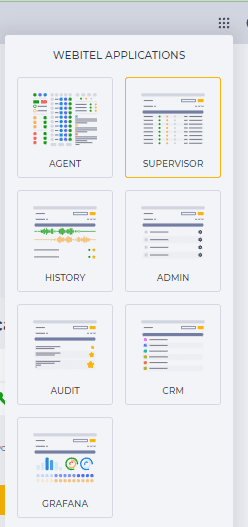
Fig. 3. Application menu
1.4. User menu
Clicking on the icon 
-
Username information;
-
Docs - redirects to the Webitel documentation page;
-
Settings - redirects to the Settings page;
-
Logout - exit from the system;
-
Build version information.
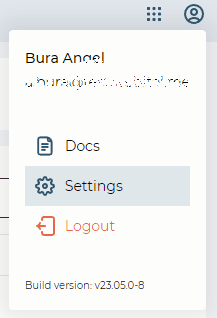
Fig. 4. User menu
1.5. Main menu
Displays the available sections to the User (Fig.1(4)).
Consists of sections such as: