
1. Description
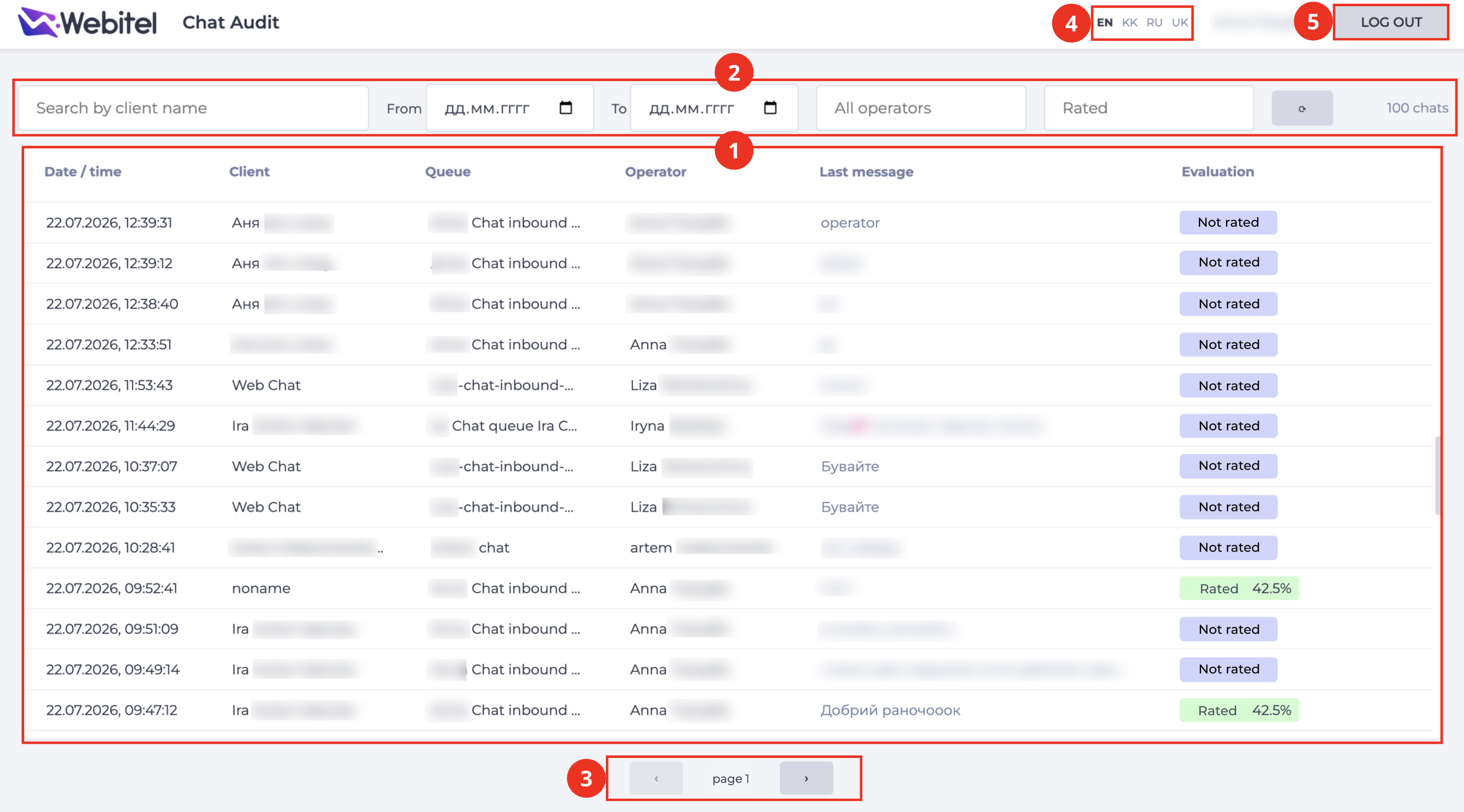
The page is intended for viewing the list of chats available for audit (evaluating the quality of operator service) and for proceeding to evaluate the selected chat.
The list displays only closed chats in which a single operator participated (without transfers).
Consists of the following elements:
-
Records registry (Fig. 1.(1));
-
Filter panel (Fig. 1.(2));
-
Pagination (Fig. 1.(3));
-
Interface language switcher (Fig. 1.(4));
-
"Log out" button (Fig. 1.(5)).
1.1. Records registry
The registry is a list of chats. Each record consists of the following columns:
-
Date/time — the date and time the chat started;
-
Client — the client's name;
-
Queue — the queue the chat was routed to;
-
Operator — the operator who handled the chat;
-
Last message — the text of the last message in the conversation;
-
Evaluation — the chat's evaluation status:
-
Not rated — the chat has not been evaluated yet;
-
Rated <percentage>% — the chat has been evaluated, the evaluation result is displayed as a percentage.
-
Clicking on a record opens the communication page of the selected chat.
1.2. Filter panel
Consists of the following elements:
-
Search by client name field — filters the list by client name;
-
From field — the start date of the period for which chats are displayed;
-
To field — the end date of the period for which chats are displayed;
-
All operators field — filters by the operator who handled the chat;
-
Rated field — filters by evaluation status (rated / not rated);
-
the list refresh button.
The total number of chats matching the applied filters is displayed to the right of the filter panel (for example, "100 chats").
1.3. Pagination
Used to switch between pages of the records list using the forward and back buttons.
1.4. Interface language switcher
Allows selecting the language in which the page is displayed.
1.5. Log out button
Ends the user's session and returns to the login page.