
1. Description
The tab is available for SIP Trunking.
It automatically transfers IPs from the General tab (Proxy field). You can also add more IPs, if necessary.
It consists of the following elements:
-
Add tool (Fig.1(1))
-
Registry (Fig.1(2)).
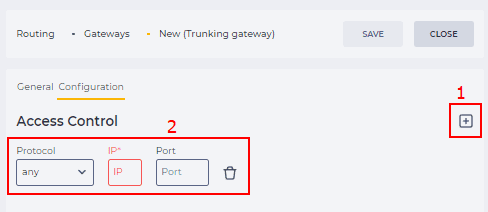
Fig. 1. Configuration tab
1.1. Add tool
When you click the 
1.2. Registry
The registry is a list of entries; each entry consists of fields indicating which protocol, IP, and port requests from the provider will come. There is also a tool to delete the entry.
Clicking on the Protocol field opens a drop-down list of available protocols, namely:
-
any;
-
udp;
-
tcp.
2. Opportunities
2.1. Add a Configuration
|
Goal |
Add a Configuration |
|---|---|
|
Preconditions |
|
|
Steps
|
|
|
Result |
Data saved. |
2.2. Delete a Configuration
|
Goal |
Delete a Configuration |
|---|---|
|
Preconditions |
|
|
Steps
|
|
|
Result |
Data saved. |

2.3. Edit a Configuration
|
Goal |
Edit a Configuration |
|---|---|
|
Preconditions |
|
|
Steps
|
|
|
Result |
Data saved. |