
1. Description
Directory for saving variables in encrypted form.
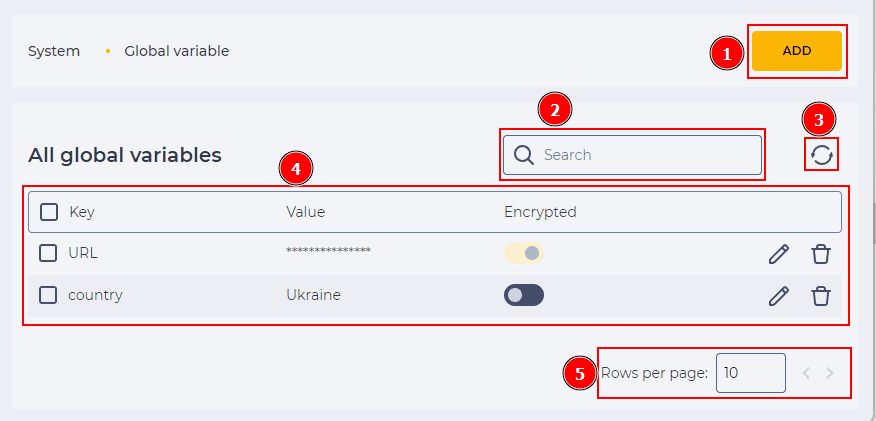
It consists of the following elements:
-
Creation tool (Fig.1(1));
-
Search field (Fig.1(2));
-
Refresh button (Fig.1(3));
-
Registry (Fig.1(4));
-
Pagination (Fig.1(5)).
1.1. Creation tool
Use the Add button to create a new Global variable (Fig.1(1)). After clicking the button, the New global variable modal window (Fig.2) opens.
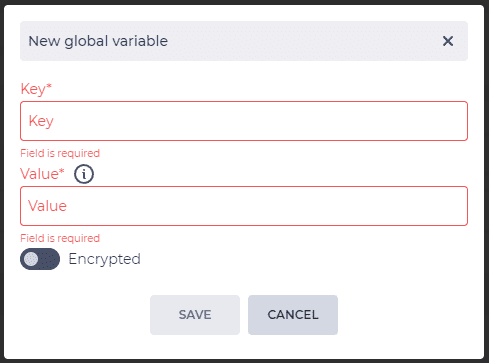
The New parameter modal window consists of the following:
-
Key - the key of the variable;
-
Value - the value of the variable;
-
Encrypted - switch is responsible for encryption of data entered in the Value field;
-
Save button - clicking the button creates a new global variable if all data are entered;
-
Cancel button - clicking on the button closes the modal window without saving data.
1.2. Search field
The search is performed on the Key column.
It consists of an input field and a close button ( 
1.3. Refresh button
Updating the register table is performed by clicking on the refresh button - 
1.4. Registry
The registry is a list of entries of existing objects in this section, each of which consists of a set of fields:
-
Checkbox;
-
Parameter;
-
Value;
-
Editing tool;
-
Removal tool.
1.4.1. Checkbox
Used to select one or more entries. An additional removal tool appears next to the search field after selecting one or more entries. Information about the number of entries chosen for deletion appears when you hover over this tool. When you click on it, a modal confirmation window appears.
It contains the Yes, No, and close ( 
-
Clicking the Yes button deletes the entries.
-
Clicking the No button closes the modal window, and the entries are not deleted.
All records on the page will be selected if you select the checkbox in the header.
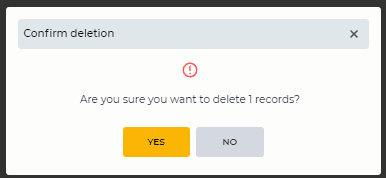
Fig. 3. Confirm deletion modal window
1.4.2. Parameter
The parameter names are displayed here.
1.4.3. Value
The parameter value is displayed here.
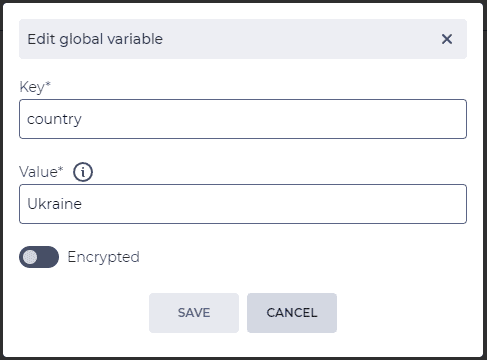
1.4.4. Editing tool
When you click the 
1.4.5. Removal tool
Used to remove an object with confirmation through a modal window. When hovering over the delete button ( 
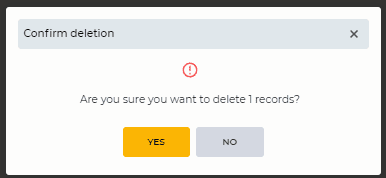
Fig. 5. Confirm deletion modal window
1.5. Pagination
It consists of the Rows per page field, which indicates the number of entries (it is possible to set from 1 to 1000) per page, and forward and backward buttons for switching pages.
2. Opportunities
2.1. Create a Global variable
|
Goal |
Create a Global variable |
|---|---|
|
Preconditions |
|
|
Steps
|
|
|
Result |
The modal window closes. Global variable is created |
2.2. Delete a Global variable
|
Goal |
Delete a Global variable |
|---|---|
|
Preconditions |
|
|
Steps
|
Find the Global variable you want to delete in the registry;
|
|
Result |
The modal window closes. The Global variable is removed. |

2.3. Delete several Global variables
|
Goal |
Delete several Global variables |
|---|---|
|
Preconditions |
|
|
Steps
|
|
|
Result |
The modal window closes. Global variables are removed. |
2.4. Edit a Global variable
|
Goal |
Edit a Global variable |
|---|---|
|
Preconditions |
|
|
Steps
|
|
|
Result |
The modal window closes. Data saved. |