
1. Description
Here you enter information about the Cognitive profile.
Consists of fields (Fig.1):
-
Name;
-
Provider;
-
Service;
-
Key;
-
Locale;
-
Region;
-
Description.
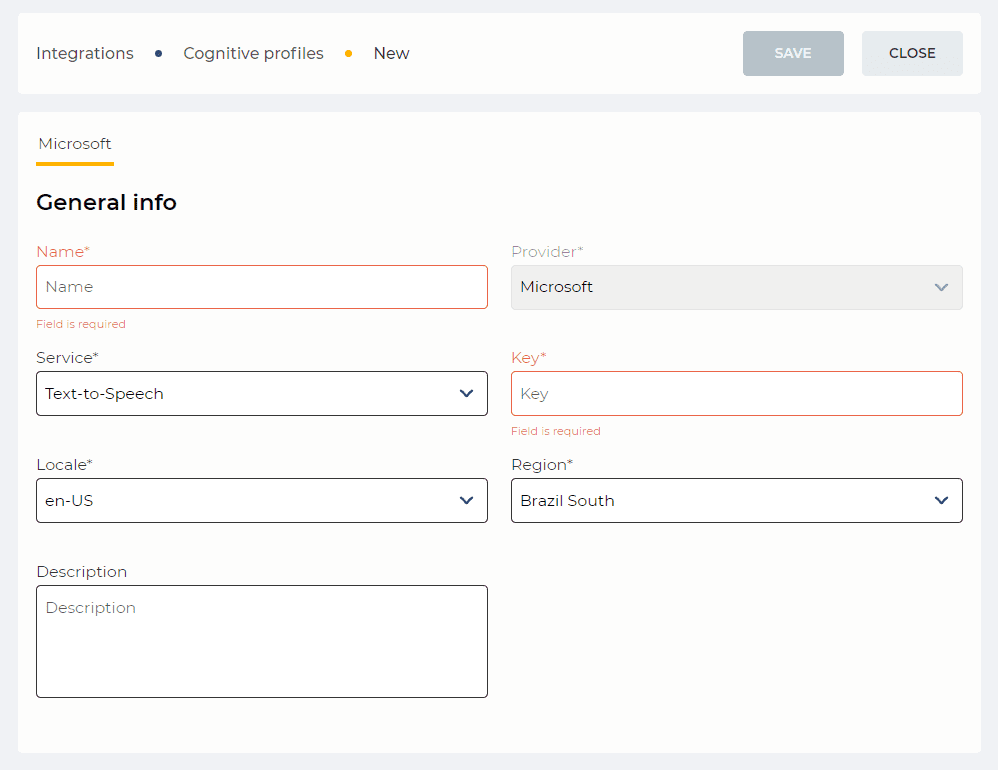
Fig. 1. Microsoft tab
1.1. Name
Required field. Here the name of the Cognitive profile is entered.
1.2. Provider
Provider selection field.
Available providers:
-
Microsoft.
1.3. Service
Service selection field.
Text-to-Speech — converted a text into sound;
Speech-to-Text — converted a sound into text.
1.4. Key
Here the license key of the provider is entered.
Transcription does not work if a trial (demo key) key is installed. There must be a commercial key with a connected card.
How to get the key can be found here.
1.5. Locale
The field for selecting the language in which the material is submitted for translation into text/sound.
1.6. Region
The field for region selection. Required to work with the provider.
1.7. Description
Here you enter the description of the Cognitive profile.
2. Opportunities
2.1. Change the Name/Key/Description
|
Goal |
Change the Name/Key/Description |
|---|---|
|
Preconditions |
|
|
Steps
|
|
|
Result |
Data saved. |
2.2. Change the Service/Locale/Region
|
Goal |
Change the Service/Locale/Region |
|---|---|
|
Preconditions |
|
|
Steps
|
|
|
Result |
Data saved. |