
1. Description
The Communication options tab contains the following tabs that display the communication settings for the Contact:
-
Phone;
-
Messaging;
-
Emails.
The Phones tab is open by default (Fig.1).
.png?cb=0f37842790b460644898e44c8798dd83)
1.1. Phones
The tab displays the parameters of the phone connection.
The 
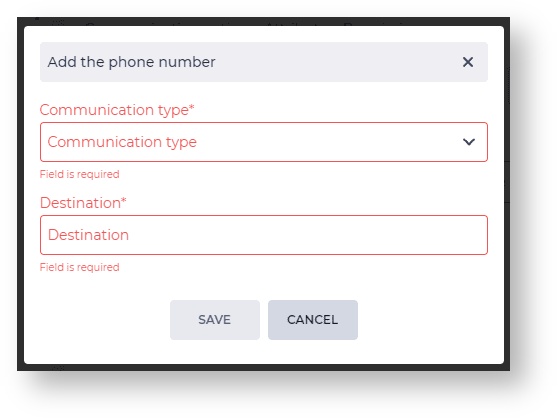
1.1.1. Add the phone number modal window
The Add the phone number modal window consists of the following fields:
-
Communication type;
-
Destination.
1.1.1.1. Communication type
The Communication type is selected in this field.
The drop-down list displays the Communication types that correspond to the communication channel.
More information about the Communication types can be found here.
1.1.1.2. Destination
The Contact's contact information, for example, a phone number, is entered here.
1.1.2. Registry
The registry consists of a set of fields:
-
Phone;
-
Communication type;
-
Editing tool;
-
Removal tool.
The 
1.1.2.1. Phone
The Contact's phone number is displayed here.
1.1.2.2. Communication type
The Communication type is displayed in this field.
1.1.2.3. Editing tool
Use the 
1.1.2.4. Removal tool
It is used to remove an object with confirmation through a modal window. A modal confirmation window appears after clicking the 
1.2. Messaging
Tab that displays the Contact's bindings to chats.
1.2.2. Registry
The registry consists of a set of fields:
-
Provider;
-
Gateway;
-
Username;
-
Removal tool.
1.2.2.1. Provider
This field displays the provider.
1.2.2.2. Gateway
This field displays the Chat gateways from which the connection to the Contact was made.
1.2.2.3. Username
This field displays the messenger username.
1.2.2.4. Removal tool
It is used to remove an object with confirmation through a modal window. A modal confirmation window appears after clicking the
1.3. Emails
The tab in which the communication options of the Email channel are displayed.
The
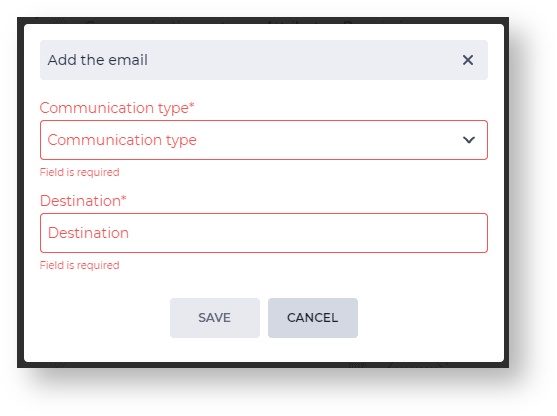
1.3.1. Add the email modal window
The Add the email modal window consists of the following fields:
-
Communication type;
-
Destination.
1.3.1.1. Communication type
The Communication type is selected in this field.
The drop-down list displays the Communication types that correspond to the communication channel.
More information about the Communication types can be found here.
1.3.1.2. Destination
The Contact's contact information, for example, a phone number, is entered here.
1.3.2. Registry
The registry consists of a set of fields:
-
Email;
-
Communication type;
-
Editing tool;
-
Removal tool.
The
1.3.2.1. Email
The Contact's email address is displayed here.
1.3.2.2. Communication type
The Communication type is displayed in this field.
1.3.2.3. Editing tool
Use the 
1.3.2.4. Removal tool
It is used to remove an object with confirmation through a modal window. A modal confirmation window appears after clicking the button. Clicking the Yes button — deletes the object and the entry. Clicking the No button closes the modal window, and the object is not deleted.