
1. Description
It is designed to view the history of calls served by the Agent.
It consists of the following elements:
-
Top bar (Fig. 1.(1));
-
Filter block (Fig. 1.(2));
-
Registry (Fig. 1.(3));
-
Pagination (Fig. 1.(4)).
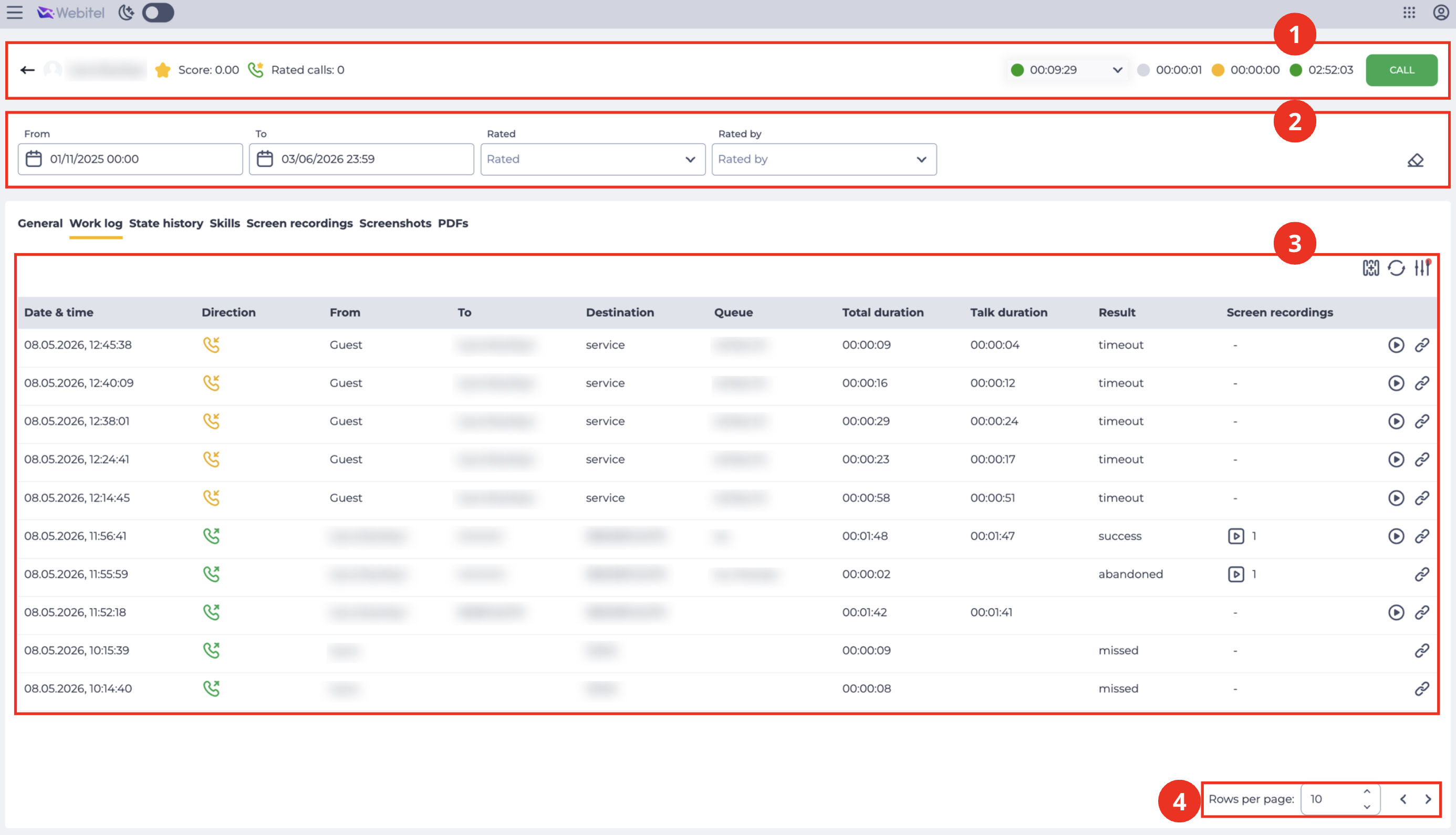
1.1. Top bar
The top bar contains the agent’s key indicators and control tools. For a detailed description of its elements and logic, refer to the dedicated documentation.
1.2. Filter block
It is designed to filter the data displayed in the registry.
It consists of the following elements:
-
Filtering fields (Fig. 2.(1));
-
Reset filters button (Fig. 2.(2)).

1.2.1. Filtering fields
Available fields for filtering:
-
From - sets the start time of the period for which you want to view data;
-
To - sets the end time of the period for which you want to view the data.
1.2.2. Reset filters button
Represented as a button 
1.3. Registry
It is designed to display records with call data.
It consists of the following elements:
-
Select visible columns (Fig. 3.(1));
-
Refresh button (Fig. 3.(2));
-
Expand filters button (Fig. 3.(3));
-
Registry (Fig. 3.(4)).
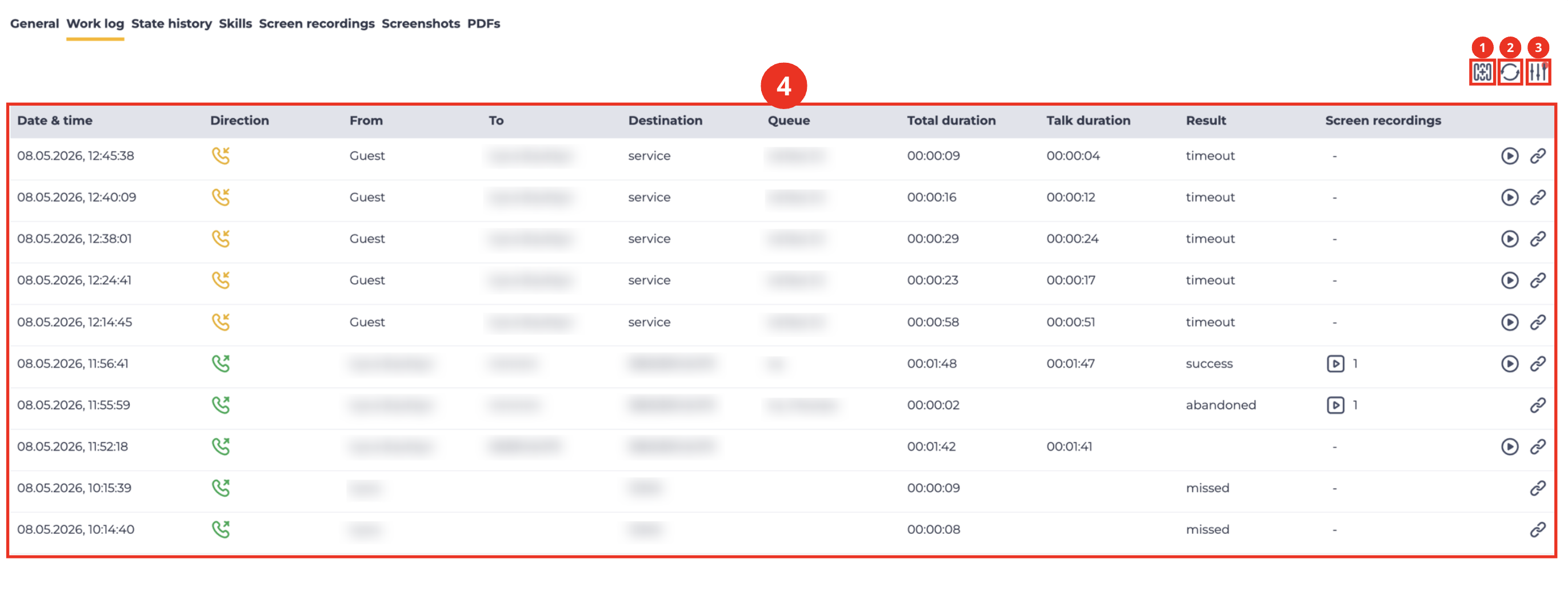
1.3.1. Select visible columns
It is designed to select the columns displayed in the registry.
The Select visible columns modal window opens (Fig. 4) when you click the 
.png?cb=3ed833df36fe2975ca289eb7ac427656)
-
Select the checkbox (Fig. 4.(1)) - this column is displayed in the registry;
-
Clear the checkbox (Fig. 4.(2)) - this column is not displayed in the registry.
1.3.2. Refresh button
Updating the register table is performed by clicking on the refresh button - 
1.3.3. Expand filters button
Represented as a 
Note
The number of fields displayed may vary depending on the browser window size. Use the
1.3.4. Registry
The data in the registry is updated every 10 seconds.
The following columns are available in the registry:
-
Date & time;
-
Direction;
-
Answered at;
-
Bridged at;
-
Queue bridged at;
-
Joined at;
-
Leaving at;
-
Hangup at;
-
Reporting at;
-
User;
-
Extension;
-
From;
-
To;
-
Destination;
-
Gateway;
-
Team;
-
Queue;
-
Member;
-
Duration;
-
Tags;
-
Display;
-
Hold;
-
Wait;
-
Billing;
-
Reporting;
-
Queue wait;
-
Queue duration;
-
Result;
-
SIP code;
-
Hangup cause;
-
Blind transfer;
-
Score;
-
Rated By;
-
Screen recordings;
-
Listening and Viewing a Recording;
-
Open in History.
1.3.4.1. Date & time
Displays the date and time of the event that occurred.
1.3.4.2. Direction
Displays call directions:
-

-

1.3.4.3. Answered at
The time when the connection with the subscriber took place is displayed — calls began to come to the subscriber.
1.3.4.4. Bridged at
Displays the connection time of the subscriber, or another Webitel User, with the Agent.
1.3.4.5. Queue bridged at
Displays the connection time of the Agent with the Subscriber.
The difference between Bridged at and Queue bridged at is that Bridged at displays the time for both calls from the Queue and internal calls, while Queue bridged at only displays the time for calls from Queues.
1.3.4.6. Joined at
Displays the time when the subscriber got into the Queue.
1.3.4.7. Leaving at
Displays the time when the subscriber left the Queue. The exit from the Queue is the connection with the Agent or the end of the call.
1.3.4.8. Hangup at
Displays the time the call ended.
1.3.4.9. Reporting at
Displays the time when Postprocessing started.
1.3.4.10. User
Displays the username.
1.3.4.11. Extension
Displays the user's Extension. Depending on the type of call, it has different meanings (see Tab. 1).
1.3.4.12. From
Displays the number from which the call originated. Depending on the type of call, it has different meanings (see Tab. 1).
1.3.4.13. To
Displays the number of the called party. Depending on the type of call, it has different meanings (see Tab. 1).
1.3.4.14. Destination
The number being called is displayed. Depending on the type of call, it has different meanings (see Tab. 1).
|
|
Сolumns |
|||
|---|---|---|---|---|
|
Call type |
From |
To |
Destination |
Extension |
|
Inbound |
Subscriber's number |
Webitel User number (filled in after the User has picked up the phone) |
The number dialed by the Subscriber |
|
|
Outbound IVR |
The number that is entered in the settings of the Resource through which the call is made |
The number of the Subscriber to whom the call is being made (after modification, if digits were taken away or added) |
Subscriber's number |
|
|
Preview dialer |
User Extension (Webitel) |
The number of the Subscriber to whom the call is being made (after modification, if digits were taken away or added) |
Subscriber's number |
User Extension (Webitel) |
|
Progressive dialer |
The number that is entered in the settings of the Resource through which the call is made
|
|
Subscriber's number |
|
|
Predictive dialer |
The number that is entered in the settings of the Resource through which the call is made
|
|
Subscriber's number |
|
|
Outbound |
User Extension (Webitel) |
The number of the Subscriber to whom the call is being made (after modification, if digits were taken away or added) |
The number dialed by Webitel User/Agent |
User Extension (Webitel) |
|
Internal between Users |
User Extension (initiator of the call) |
User Extension (recipient of the call) |
User Extension (recipient of the call) |
User Extension (initiator of the call) |
Tab. 1. Display data depending on the type of call
1.3.4.15. Gateway
Displays information on the Gateway that was used in this case.
1.3.4.16. Team
Displays the Agent's Team.
1.3.4.17. Queue
Displays the Queue that the call came from.
1.3.4.18. Member
Subscriber information is displayed.
1.3.4.19. Duration
Displays the amount of time spent on the call.
1.3.4.20. Tags
It is present in the records of calls in which an answering machine is configured in the routing with the ability to record a voice message.
1.3.4.21. Display
The number that is entered in the Resource settings is called through.
1.3.4.22. Hold
Displays the amount of time the call has been on hold. If there was no hold, the field is empty.
1.3.4.23. Wait
Displays the connection timeout.
1.3.4.24. Billing
Displays the amount of time the Subscriber has been connected to the Agent.
1.3.4.25. Reporting
Displays the amount of time the Agent spent on postprocessing.
1.3.4.26. Queue wait
Displays the time spent by the Agent in the Queue, from entering the Queue until the moment of connection with the Agent or until the end of the call in the case when the Subscriber ended the call without waiting for the Agent.
1.3.4.27. Queue duration
Displays the time spent by the Agent in the Queue from the moment they enter the Queue until the end of the call.
1.3.4.28. Result
Displays the result. There are the following result options:
-
missed - missed by the Agent, present only in the Preview dialer, when the Dialer did not reach the Agent and, accordingly, does not dial the Subscriber;
-
timeout - present in calls that have postprocessing configured. It is set if the Agent did not have time to finish postprocessing in time;
-
failed - did not get through to the Subscriber;
-
abandoned - got through to the Subscriber, but there was no connection with the Agent;
-
success - successful result;
-
cancel - canceled.
1.3.4.29. SIP code
Displays the SIP call termination code. Possible reasons can be found in Table 2.
1.3.4.30. Hangup cause
Displays the reason for ending the call. Possible reasons can be found in Table 2.
When receiving/sending a HangUp event, we receive/send Cause Code, i.e., the reason the call ends and the subscriber leaves the queue.
In the table below you can view all Cause Codes used in ISDN telephony that correspond to the Q.850 protocol.
|
ITU-T Q.850 Code |
SIP answer |
Cause |
Description |
|---|---|---|---|
|
0 |
— |
UNSPECIFIED
|
It is issued by the router when none of the other codes fit. This cause usually occurs in situations similar to causes 1, 88, and 100. |
|
1 |
404 |
UNALLOCATED_NUMBER
|
This cause indicates that called side cannot be reached because although the called side number possesses a valid format, currently it is not assigned (assigned). |
|
2 |
404 |
NO_ROUTE_TRANSIT_NET
|
This cause indicates that the equipment sending this cause has received a request for call routing through a particular transit network which it does not recognize. The equipment sending this cause does not recognize the transit network for the following reasons: the transit network does not exist or that particular transit network, although it exists, does not maintain the equipment sending this cause. |
|
3 |
404 |
NO_ROUTE_DESTINATION
|
This cause indicates that called side cannot be reached because a network through which the call has been routed doesn’t maintain a desirable destination. This cause is supported depending on the network. |
|
6 |
— |
CHANNEL_UNACCEPTABLE
|
This cause indicates that the last identified channel is not acceptable for the sending object to use in this call. |
|
7 |
— |
CALL_AWARDED_DELIVERED
|
A user has been given an incoming call, and the incoming call connects to the channel already set for that user for similar calls (for example, x.25 virtual calls in a package mode). |
|
16 |
— |
NORMAL_CLEARING
|
Normal call termination |
|
17 |
486 |
USER_BUSY
|
The called side cannot take another call because the user's busy state has been detected. This cause value can be created by a called user or network. In case when the user is detected as busy, it is noted that the user’s equipment is compatible with the call. |
|
18 |
408 |
NO_USER_RESPONSE
|
The called side doesn't respond to a message of call establishing, warning, or connection indication during an established period. |
|
19 |
480 |
NO_ANSWER
|
This cause is used when a called side has been warned but is not answering with a connection indication during the prescribed period. A note: this cause is not necessarily generated by the Q.931 procedures but can be caused by the internal network timers. |
|
20 |
480 |
SUBSCRIBER_ABSENT
|
This cause value is used when the mobile station has logged out of the system, the radio connection with the mobile station has not been established, or the personal radio connection user temporary does not possess the address on any user network interface |
|
21 |
603 |
CALL_REJECTED
|
This cause indicates that the equipment sending this cause does not wish to receive this call although it may have accepted this call because the equipment sending this cause is not busy or incompatible. A network also can generate this reason indicating that the call has been rejected due to the restrictions of additional service. The diagnostics field may include additional information about the additional service and the reason for denying. |
|
22 |
410 |
NUMBER_CHANGED
|
This cause is returned to the calling side when the called side’s number specified by the calling side is no longer assigned. The new calling side number may be optionally included in the diagnostics field. When the network does not support this cause, it means the reason №1: unallocated (unassigned) number must be used. |
|
23 |
410 |
REDIRECTION_TO_NEW_DESTINATION
|
This cause is used by the general ISUP protocol mechanism which can be launched by the commutator that decides to establish a call to another called number. This exchange may cause a redirection mechanism that uses this cause value to request a previous exchange participating in the call to route the call to the new number. |
|
25 |
483 |
EXCHANGE_ROUTING_ERROR
|
This cause indicates that the destination point specified by the user cannot be reached because the intermediate commutator has disabled the call due to reaching the limit while executing the hop counter procedure. This cause is generated by the intermediate node that produces a result of 0 when the hop counter value is decreasing. |
|
27 |
502 |
DESTINATION_OUT_OF_ORDER
|
This cause indicates that the destination point specified by the user cannot be reached because the interface of the destination point does not work properly. The ‘does not work properly’ term means that the signaling message could not be delivered to the remote side; for example, physical level failure, level of data transmission channel on the remote side, or the disabled user’s equipment. |
|
28 |
484 |
INVALID_NUMBER_FORMAT
|
This cause indicates that a called side cannot be reached because the called side number has an invalid or incomplete format. |
|
29 |
501 |
FACILITY_REJECTED
|
This cause returns when an additional service requested by the user cannot be provided by the network. |
|
30 |
|
RESPONSE_TO_STATUS_ENQUIRY
|
This cause is included in the STATUS message when the prior receipt of the STATUS INQUIRY was a reason for generating the STATUS message. |
|
31 |
480 |
NORMAL_UNSPECIFIED
|
This reason is used to report a normal event only when none of the other reasons in the normal class apply. |
|
34 |
503 |
NORMAL_CIRCUIT_CONGESTION
|
This cause indicates that all lines are busy — the provider does not have enough available lines to handle the call. |
|
38 |
503 |
NETWORK_OUT_OF_ORDER
|
This cause indicates that a network is not working properly, and this state is likely to last for a long time so the immediate call retry is unlikely to be successful . |
|
41 |
503 |
NORMAL_TEMPORARY_FAILURE
|
This cause indicates that a network is not working properly, and this state is unlikely to last for a long time; so the user may want to make one more call attempt almost immediately. |
|
42 |
503 |
SWITCH_CONGESTION
|
This cause indicates that the switching equipment generating this cause is experiencing a high traffic period |
|
43 |
— |
ACCESS_INFO_DISCARDED
|
This cause indicates that a network couldn’t deliver to the remote user information about access according to the request, i.e the information between users, low-level compatibility, high-level compatibility, or subaddress as specified in the diagnostics. |
|
44 |
503 |
REQUESTED_CHAN_UNAVAIL
|
This cause comes back when another side of the interface cannot provide the scheme or channel indicated by the requesting object. |
|
50 |
— |
FACILITY_NOT_SUBSCRIBED
|
This cause indicates that a user has requested an additional service that is available but the user is not authorized to use. |
|
52 |
403 |
OUTGOING_CALL_BARRED
|
This cause indicates that although the calling side is a subscriber of the CUG outbound call, the outbound calls are not allowed for this CUG subscriber. |
|
54 |
403 |
INCOMING_CALL_BARRED
|
This cause indicates that although the called side is a CUG subscriber for the inbound call, the inbound calls are not allowed for this CUG subscriber. |
|
57 |
403 |
BEARERCAPABILITY_NOTAUTH
|
This cause indicates that a user has requested a transfer capability that is implemented by the equipment that generated this cause but the user is not authorized to use. |
|
58 |
503 |
BEARERCAPABILITY_NOTAVAIL
|
This cause indicates that a user has requested a transfer capability that is implemented by the equipment that generated this cause but which is currently unavailable. |
|
63 |
— |
SERVICE_UNAVAILABLE
|
This cause is used for informing about the cause of service or parameter unavailability only when none of the other reasons in the service class or parameter unavailability apply. |
|
65 |
488 |
BEARERCAPABILITY_NOTIMPL
|
This cause indicates that the equipment sending this cause does not support the requested transfer capability. |
|
66 |
|
CHAN_NOT_IMPLEMENTED
|
This cause indicates that the equipment sending this cause does not support the requested channel type. |
|
69 |
501 |
FACILITY_NOT_IMPLEMENTED
|
This cause indicates that the equipment sending this cause does not support the requested additional services |
|
79 |
501 |
SERVICE_NOT_IMPLEMENTED
|
This cause is used for informing about the cause that is related to the unimplemented service or parameter only if none of the other reasons in the class of unimplemented service or parameter apply. |
|
81 |
— |
INVALID_CALL_REFERENCE
|
This cause indicates that the equipment sending this cause received a message with a link to a call that is not currently used in the user-network. |
|
88 |
488 |
INCOMPATIBLE_DESTINATION
|
This cause indicates that the equipment sending this cause has received a request to establish a call that has low-level compatibility, high-level compatibility, or other compatibility attributes (for example, data transmission speed) which cannot be implemented. |
|
95 |
— |
INVALID_MSG_UNSPECIFIED
|
This reason is used for informing about invalid message cause only if any other reason in the invalid message class does not apply. |
|
96 |
— |
MANDATORY_IE_MISSING
|
This cause indicates that the equipment sending this cause has received a message without an information element that must be present in the message before this message can be processed. |
|
97 |
— |
MESSAGE_TYPE_NONEXIST
|
This cause indicates that the equipment sending this cause has received a message with a message type it does not recognize because this message is not defined or defined but not implemented by the equipment sending this cause. |
|
98 |
— |
WRONG_MESSAGE
|
This cause indicates that the equipment sending this cause has received a message that the procedures do not indicate that it is a valid message to receive in the call state, or that a STATUS message was received indicating the incompatible call state. |
|
99 |
— |
IE_NONEXIST
|
This cause indicates that the equipment sending this cause has received a message including unrecognizable information element (s) because the information element (s) / parameter (s) name (s) is (are) not defined or defined but not implemented by the equipment sending this cause. This reason indicates that the information element (s) has (have) been discarded. However, the information element is not obligated to be present in the message to allow the equipment sending this cause to process the message. |
|
100 |
— |
INVALID_IE_CONTENTS
|
This cause indicates that the equipment sending this cause has received the information element that was implemented by it. However, one or several fields in the I.E. are encoded in a way that hasn’t been implemented by the equipment sending this cause |
|
101 |
— |
WRONG_CALL_STATE
|
This cause indicates that a message non-compliant with the call state has been received. |
|
102 |
504 |
RECOVERY_ON_TIMER_EXPIRE
|
This reason indicates that a procedure was initiated by timer expiration connected with error processing procedures. This is often caused by NAT issues. Make sure «NAT Mapping Enable» is activated in your ATA. If it isn’t concerning NAT, sometimes it refers to a provider. Check if another outbound provider can solve a problem. |
|
103 |
— |
MANDATORY_IE_LENGTH_ERROR
|
This cause indicates that the equipment sending this cause has received a message including parameters that are not recognized because parameters are not defined or defined but not implemented by the equipment sending this cause. The reason indicates that the parameters have been ignored. Besides, if the equipment sending this cause is an intermediate point thus this cause indicates that the parameter (parameters) was (were) transmitted without changes. |
|
111 |
— |
PROTOCOL_ERROR
|
This reason is used for informing about protocol error cause only in case when none of the other causes in the protocol error class apply. |
|
127 |
— |
INTERWORKING
|
This reason indicates that an internetwork call (usually an SW56 service call) has ended. |
|
503 |
— |
MANAGER_REQUEST
|
This cause is used when you send an API command to end the call. |
|
605 |
— |
PICKED_OFF
|
This cause means that the call was picked up from another added number. |
|
606 |
— |
USER_NOT_REGISTERED
|
This means you tried to call a SIP user that has not been registered. |
|
609 |
— |
GATEWAY_DOWN
|
Gateway is down (does not respond to OPTIONS or SUBSCRIBE) |
|
687 |
— |
ABANDONED
|
This means that the call was canceled by the dialer |
|
— |
— |
ORIGINATOR_CANCEL
|
The call originator (agent or client) ended the call before receiving the answer (Answer) |
|
— |
— |
SYSTEM_SHUTDOWN
|
This cause indicates that the call was terminated due to a system shutdown or restart during active calls. |
Tab. 2. Hangup cause
1.3.4.31. Blind transfer
The number to which the blind transfer was made is displayed here. When there is no blind transfer, the field remains empty.
1.3.4.32. Score
Displays the score given by the evaluator.
A call can only be scored once.
Scores from contact center calls, internal calls, and outbound calls are all taken into account.
1.3.4.33. Rated By
Displays the evaluator — the person who rated the dialog.
1.3.4.34. Screen recordings
Displays the number of agent screen recordings made during a call.
The column consists of:
-
An icon

-
A numeric value — the number of available screen recordings.
The availability and number of video recordings are determined by the Agent screen control switch enabled for the agent or team, as well as the value of the wbt_record_screen variable at the time of the call.
If no screen recording was made, a dash “—” is displayed instead of a number.
Clicking the icon
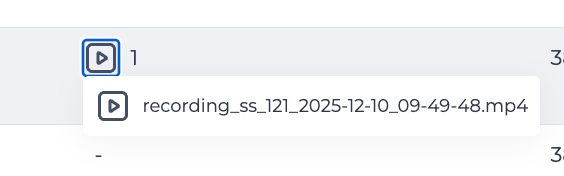
Clicking a recording name opens the screen recording playback window.
The player behavior is identical to that described in 1.3.4.35. Listening and Viewing a Recording.
1.3.4.35. Listening and Viewing a Recording
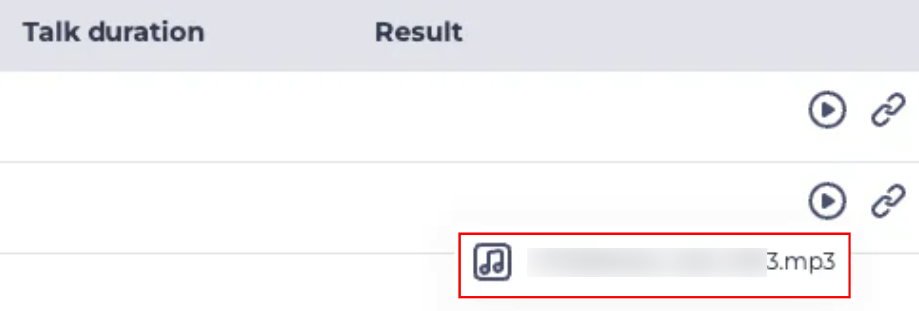
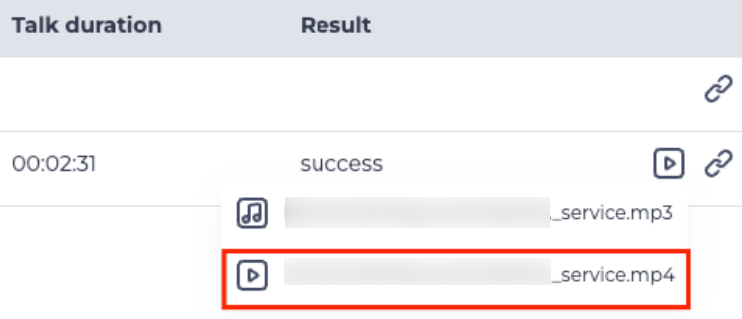
If a recording is available for a call, a play icon is displayed in the row. Clicking it opens a list of available recordings:
-
a row with an audio icon

-
a row with a video icon

If a call contains a video recording, the play icon in the table row is displayed as a video recording icon
Clicking a row with an audio recording (Fig. 6) opens an audio player in the bottom panel.
The player contains the following elements:
-
play/pause button (Fig. 7.(1));
-
progress bar (Fig. 7.(2));
-
timeline (Fig. 7.(3));
-
volume control (Fig. 7.(4));
-
download recording button (Fig. 7.(5));
-
close player button (Fig. 7.(6)).

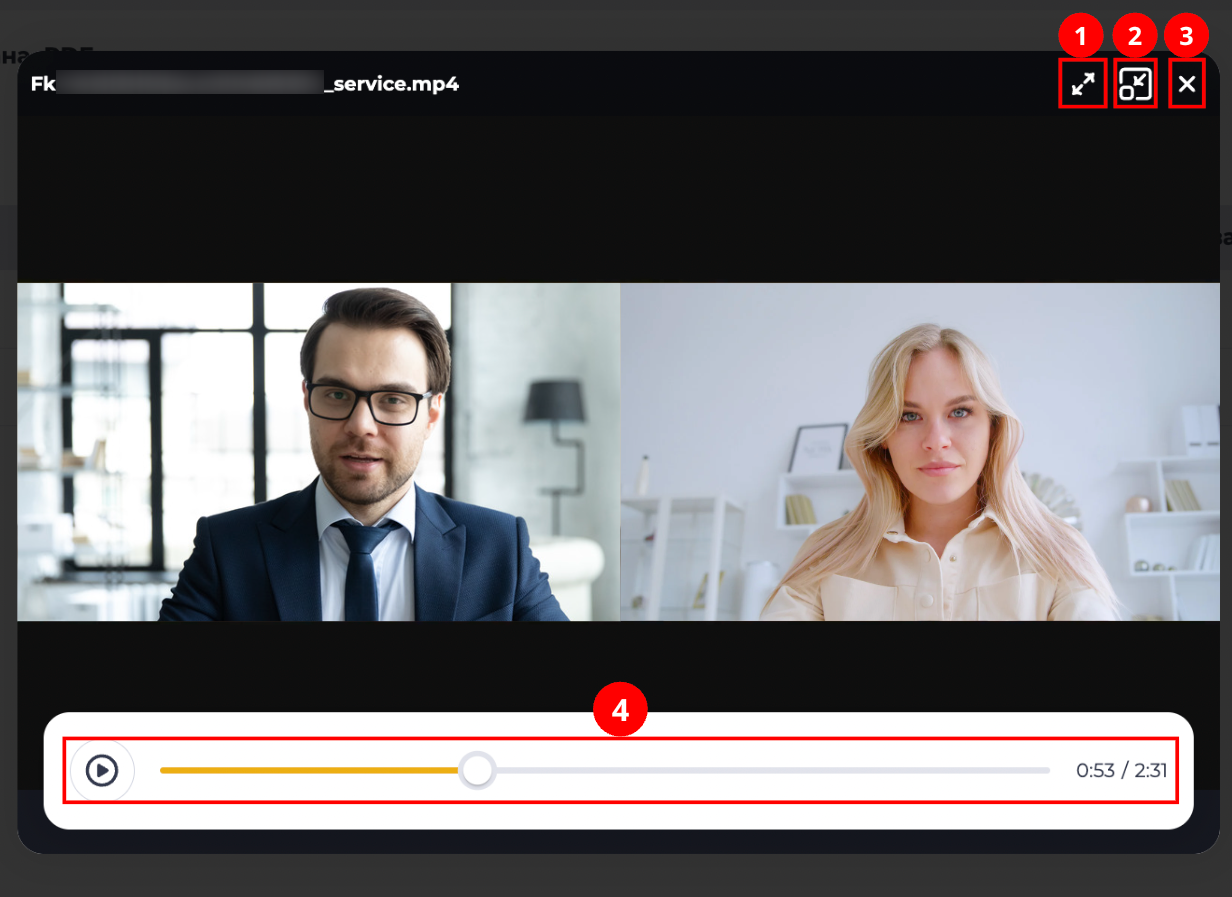
Clicking a row with a video recording (Fig. 8) opens a viewing window.
When hovering over the window, the following controls appear:
-
full-screen expand icon (Fig. 9.(1));
-
medium-size expand icon (Fig. 9.(2));
-
close window icon (Fig. 9.(3)).
A player with a play/pause button and a timeline is located at the bottom of the window (Fig. 9.(4)). When switching to medium or full-screen mode, the corresponding expand icon is replaced by a collapse icon that returns the window to its previous size.
1.3.4.36. Open in History
Clicking the icon 
1.4. Pagination
It consists of the Rows per page field, which indicates the number of entries (it is possible to set from 1 to 1000) per page, and forward and backward buttons for switching pages.
2. Opportunities
2.1. View information for a specific period
|
Goal |
View information for a specific period |
|---|---|
|
Preconditions |
|
|
Steps
|
|
|
Result |
The registry displays records for the selected period. |
2.2. Selection of displayed columns in the registry
|
Goal |
Select of displayed columns in the registry |
|---|---|
|
Preconditions |
|
|
Steps
|
|
|
Result |
The modal window closes. The selected columns are displayed in the registry. |
